You have two options on how to do this; both can be accomplished with GOTOES and one of the following: (Google Sheets, Libre Office, Microsoft Excel, etc):
Option 1 (if your source file(s) are FIT):
Convert your
FIT file to CSV. Just upload the FIT file, and spit it out as a CSV file. Make sure to include File ID, Creator, Sport, and Session to get the most out of this. Make the changes in your Spreadsheet program (i.e. D5=B5*2) and once you’re done, re-import the CSV file to GOTOES and export it as FIT, GPX, or TCX to be imported into Strava.
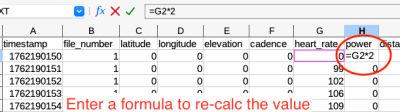
- Calculate the new values in a spreadsheet program
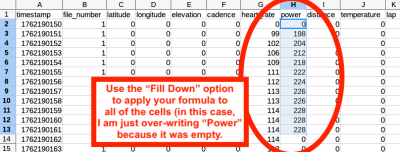
- Use the "Fill Down" feature to apply the calculation to all cells.
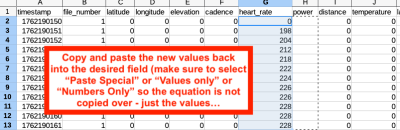
- Copy and paste - make sure to select "Paste Special" or use whatever technique is needed to paste only the values - not the equations (otherwise you might get an error). Save the modified file and re-upload to the GOTOES merger tool. Even though it is called a Merge tool, you can upload single files too for the sake of converting to GPX / TCX / FIT
Option 2 (for all file types including GPX, JSON, TCX, FIT):
Upload your file(s) to
the GOTOES Merge Tool and once the 2nd page (the one with the settings) become visible, look at the bottom where it says, “Download Raw Data (CSV)”- Click that (you will need to be signed into your GOTOES account)… and do the same as above - edit the CSV and then re-import to GOTOES to convert to FIT, GPX, or TCX.
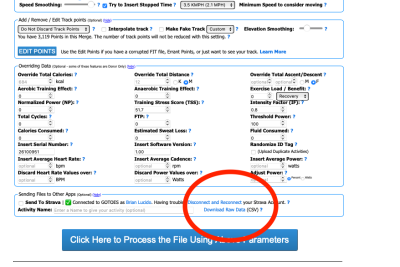
- Convert your GPS data to CSV for bulk manipulation; you can re-upload the modified CSV to GOTOES to convert it back to GPX / TCX / FIT
Option 3 (Not advisable for bulk edits, but added so users can see all options):
This is the tedious option you mentioned - and it works if you need to edit a few items... but editing in bulk would be very slow.
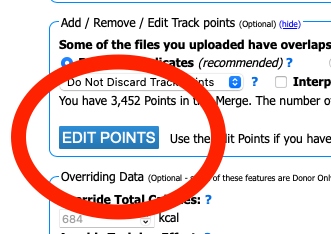
- Click on "Edit Points" only if you need to edit just a few points.
- Screenshot 2025-11-04 at 7.05.56 AM.png (33.05 KiB) Viewed 3420 times
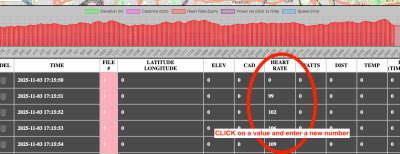
- Once you click on "Edit Points" a table pops up where you can edit items one-at-a-time.
GOTOES accounts are free if you don’t already have one. The benefit to signing in is that all of your settings will be saved for future use across browsers. Sign in is required for certain download types to protect user privacy.