Page 1 of 1
Strava upload - unrecognized error
Posted: Fri Nov 14, 2025 11:17 am
by pseudonym
Hello,
I have been riding at a bike park today and accidentally recorded one of my uplifts in the middle of the day. So I've tried using gotoes to produce a file without the uplift, but I'm getting the following error in Strava when I try to upload the gotoes file:
'The upload has an unrecognized error. Please contact Support..'
Process:
- Activity record in Workout on Apple Watch, and automatically imported into Strava.
- In Strava I split the original activity into two separate activities at the point where the uplift was recorded.
- In Strava I cropped the activity which included the uplift.
- Exported both activities as GPX.
- Imported both gpx files into Gotoes.
- After a brief delay, the activity edit fields would flash onscreen in Strava, before being replaced with an error message: "The upload has an unrecognized error. Please contact Support.."
- Tried exporting the same file from gotoes as a TCX file. Strava behaved identically.
Any ideas?
Re: Strava upload - unrecognized error
Posted: Fri Nov 14, 2025 6:46 pm
by fulmar2
I wonder if you just encountered a Strava Glitch? I uploaded your GOTOES file to my account and it showed up with no issue.
I don't know what an "uplift" is, but I think you are referring to the straight lines on the map? If that is the case, it will kind of be impossible to remove the visual line. I have a
detailed report on straight lines in GPS tracks here. Essentially, Strava will ALWAYS draw one continuous line for activities, and even if you have a big gap, Strava will pick up where the last line left off. The benefit to using GOTOES is that with a FIT export (and maybe TCX) you can at least override the distance contributed by the line.
What I would do to save yourself time is to first try again (if you still have the TCX export from GOTOES). It should probably work now if Strava had a temporary glitch. Also, if you're trying to eliminate the distance (like I said you will never get rid of the straight lines), you must use TCX or FIT. I cannot guarantee that TCX will even work because Strava has also been overriding the embedded distance in TCX files. FIT is the most reliable way to correct for distance.
Re: Strava upload - unrecognized error
Posted: Sat Nov 15, 2025 12:07 pm
by pseudonym
Thanks for following this up.
Sounds like might be a glitch at Strava’s end.
(I wasn’t trying to get rid of the straight lines. These appear because I remembered to manually pause recording in all but one instance when I was shuttled / driven up the mountain. The bit I cropped out in Strava was a wiggly line up the road that the shuttle buses drive on.)
Re: Strava upload - unrecognized error
Posted: Sat Nov 15, 2025 3:23 pm
by fulmar2
Did it work when you tried again? Please let me know because if you continue to have an issue, I will investigate further.
Re: Strava upload - unrecognized error
Posted: Wed Nov 19, 2025 9:03 am
by pseudonym
Sorry for the delayed response – I'm on a week-long cycling holiday and I've been trying to avoid my computer.
Your screen grab looks exactly like I was hoping it would on my account.
I have just tried uploading the gotoes gpx file using both Safari and Chrome and I'm seeing the same behaviour that I described earlier.
I am no IT expert, but given it works for you and not for me I would assume that this is something caused by my browser setup, or my Strava account, or something else not related to the quality of the file that gotoes generates.
I might try and ask a friend to see if they can upload it to their account, or if I can try uploading it to my account on their computer, to try and troubleshoot where in the process the problem is occurring.
Re: Strava upload - unrecognized error
Posted: Wed Nov 19, 2025 4:41 pm
by fulmar2
Thanks for following up on this. I hope you're having a great trip! I understand how you want to avoid the computers too. I would appreciate any info you can provide just in-case this is on the GOTOES end.... in case you make a new discovery about what is happening.
Also, as an aside, if you link your GOTOES and Strava accounts, you can have GOTOES directly send the GPX straight to Strava. This saves you from having to download and re-upload the file. GOTOES accounts are free and only take a minute to setup. Then on the login dashboard, you can link your Strava to your GOTOES:
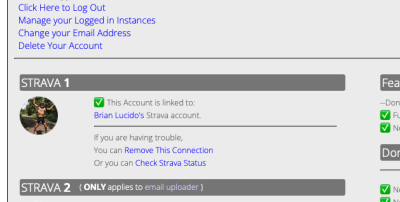
- What it looks like once you have linked your Strava and GOTOES accounts. This is in the GOTOES dashboard (the login page).
Once you have established the link between GOTOES and Strava, there is a checkbox at the bottom of the merger page that allows you to directly send the file to Strava:
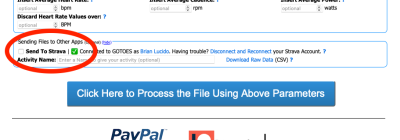
- Check the "Send to Strava" box, and GOTOES will send your edited file directly to Strava for you. This avoids the download and re-upload step.
I hope that this additional information helps you out, and please let me know if you find anything I need to do for debugging the tool for other people. Thanks!!
Re: Strava upload - unrecognized error
Posted: Wed Nov 19, 2025 4:51 pm
by fulmar2
I just thought of something! Maybe Strava is giving you the wrong error message! Strava tries to block duplicate activities.
GOTOES tries to get around this by changing the timestamps slightly - enough to bypass their blocks.. but not so much that it affects your activity. I assume that you checked the "Randomize ID tag" option, right? It is checked by default, but some people do not like the ~10 second change GOTOES applies to their activity, so I allow users to deselect that option.
Anyway, one more bombproof way to fix this would be to delete the original files from Strava that you have already uploaded. This would ensure that Strava did not detect any duplicate activity. I am wondering if they are giving you the "The upload has an unrecognized error. Please contact Support.." message when they mean to be giving you the "Duplicate Activity" message instead. Deleting the originals would certainly work around this type of issue.
Re: Strava upload - unrecognized error
Posted: Sat Nov 29, 2025 3:57 am
by pseudonym
fulmar2 wrote: Wed Nov 19, 2025 4:51 pm
I just thought of something! Maybe Strava is giving you the wrong error message! Strava tries to block duplicate activities.
You were correct.
Strava Support just replied to my updated support ticket:
"Our team has taken a look at the upload errors further and the reason if that your activity is being blocked from uploaded is because it's being recognized as a duplicate activity of the two activities it was created from on your account.
…
Normally the error would let you know that it's due to duplicates, but we're not quite sure why this isn't being displayed in the error. We'll look into this."
Sorry for the late reply. I was reluctant to delete the activities because I was continually getting errors when I tried to upload, and I didn't want to lose all record of my rides. I asked a mate to upload to his account, and to export one of his rides for me to test, but he never got around to it.
All solved.
