
How To Show All Files on the Mac
 There are two ways to show the hidden files on your Mac. First, the hard way: Using the Terminal. "Terminal" is a program that advanced users typically use... If you click Go in the apple menu bar (finder), and then you click Utilities, you will come to a folder that has the Terminal application. Start Terminal by double clicking the icon. Next, Type the following into the terminal:
defaults write com.apple.Finder AppleShowAllFiles YES
Press Enter, then type:
killall FINDER
Press Enter again.
The above procedure isn't too much of a hassle if you have to do it once... but why not make it easier? If you find yourself regularly toggling between showing all files, and hiding them, try downloading our free program that switches back and forth with the click of a button.
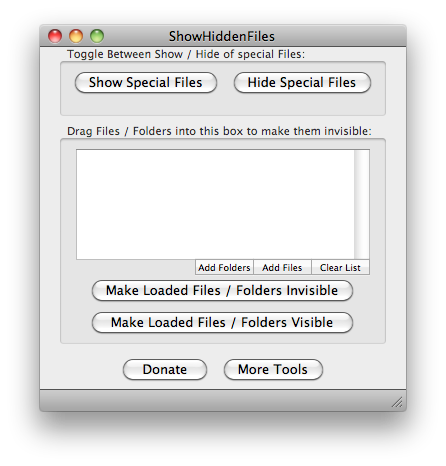 To use this program, simply run the program, and you will be presented with a few options. The top box allows you to toggle between showing and hiding files that have been designated as hidden on a mac. Just click the appropriate button, and the program will execute the two commands above. Pretty simple.
This app now also gives you control over which files / folders are visible when the AppleShowAllFiles flag is set to NO. To use this feature of the program, drag any files and folders that you wish to change the visibility of into the window in the second box. Once the files / folders are loaded, click the appropriate button to make these files visible / invisible. In order to make an invisible file become visible, you will need to have first clicked the "Show Special Files" button in box 1 (otherwise, you won't be able to see the files in order to drag them into the box).
This app is free for life, and we continue to develop it to meet our customers' needs. It is our most popular free-ware download, with hundreds of downloads per day. If you have a request or a suggestion, we strongly urge you to use the contact link (above) to let us know of your feature requests. You can help us make this application better with your requests and suggestions.
If you get good use out of the Show Hidden Files app, please leave a donation... or better yet, check out some of our licensed software for Mac OSX.
NEW FEATURE
We are building other useful tools into this application. The New tool we have added allows you to quickly rebuild the spotlight index of a selected volume. Why would you want to do this? If spotlight is having problems indexing a certain drive, rebuilding often helps. Another situation: Suppose you have a thumb drive that you plug into multiple time machine backed up computers, and you want to have this thumb drive be backed up on both machines. The way Time Machine works is that it uses the spotlight index to determine which files to back up. If you change files on one computer, and then plug your 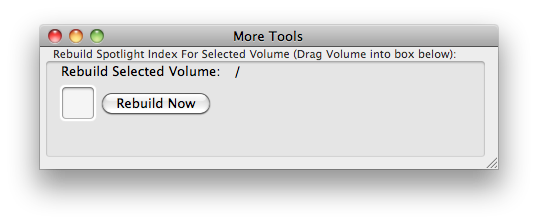 USB drive into your other computer, those changes will not be backed up on the second computer! Why? Because the second comptuer is not "aware" that the files have changed. (An exception to this if you have created new files... any newly created files will be backed up). By re-indexing spotlight for the attached volume, you will effectively inform Time Machine of all the new files that need to be backed up.
Why is Permission Denied In Mojave?
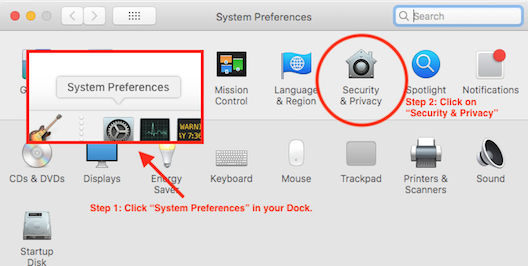
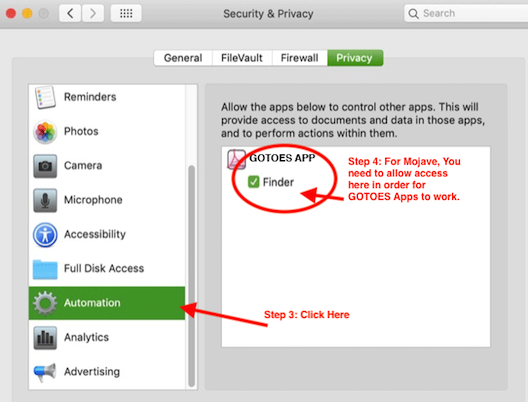
Mojave has increased security, so the first time you startup one of our apps on Mojave, you will need to grant it permissions to system events. If you did not do that on the first startup, please follow these steps:
Donation Ware
The Show Hidden Files software is available for Free. If our program really helps you out, we encourage you to help us keep it Free by making a donation.
Download Now!
Supported OSs:
Catalina (10.15) 64-bitMojave (10.14)
High Sierra (10.13)
Sierra (10.12)
El Capitan (10.11)
Yosemite (10.10)
Mavericks (10.9)
Mountain Lion (10.8)
Lion (10.7)
Snow Leopard (10.6)
Leopard (10.5)
Tiger (10.4)
Show All Files:
 The Show Hidden Files program is compatible with Mac OS X.