

Batch Image Resizer program
 If you have ever been faced with the task of resizing multiple photos - say for your web page, then this program is for you. Many people will take high-quality photos with their camera - and want to publish their pictures to the web. Transferring pictures requires bandwidth and storage space. By re-sizing your photos before you upload, you can save significant time and space. Our Batch Image Resize software allows you to do just that - resize, rotate, and otherwise manipulate your images.
Features of the Batch Image Resize software:
- You can resize several pictures using a number of options - you can set a fixed width (so all your photos have the exact same width), fixed height, or you can scale your picture up (or down) by a percentage.
- You can rotate a batch of pictures to preset angles, or to an arbitrary angle that you choose. A batch of pictures can also be flipped or inverted.
- You can add a transparent border to a batch of images
- You can save over the existing images, or you can save a copy of your resized pictures in a new location. You have the option of adding a prefix or suffix to the new picture name
- Ability to add a Watermark to your image files! To learn more about how you can add a watermark to batches of your images, Click Here
- Ability to resize pages from PDF files! Currently, you can only process the first page - an effective way to extract the first page of a PDF as an image in batch mode processing.
- If you're a developer, you can create your .icns file directly from a 1024x1024px image in seconds. To learn more about this time saving feature, Click Here
Screen Shots
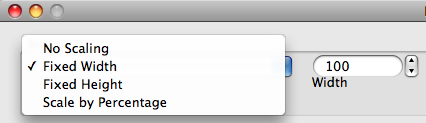
The application allows you to resize a batch of pictures to your specifications.
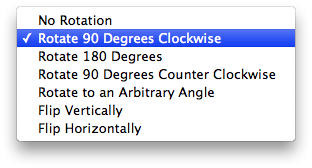
The program allows you to rotate multiple photos to any angle.

This software allows you to add a transparent border to several images at once.
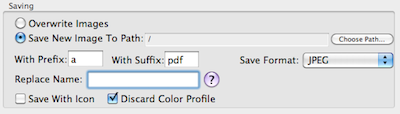
This software allows you to add an icon preview to a batch of pictures.
Page Last modified: January 23, 2015
Buy Batch Image Resizer ↓
Download a Free Trial 
Supported OSs:
Big Sur (11.0) end-of-lifeCatalina (10.15) 64-bit
Mojave (10.14)
High Sierra (10.13)
Sierra (10.12)
El Capitan (10.11)
Yosemite (10.10)
Mavericks (10.9)
Mountain Lion (10.8)
Lion (10.7)
Snow Leopard (10.6)
Leopard (10.5)
Tiger (10.4)
Batch Image Resizer:
The Batch Image Resizer software is available for immediate download after purchase. Once you have completed your transaction on PayPal's website, return to GOTOES.ORG to obtain the Batch Image Resizer software. A link is also sent by email. If you do not get the email, check your junk mail filter! The Batch Image Resizer program is compatible with Mac OS X up to Big Sur. Our free trials are full featured. The only limitations are the number of items you can process.