

Batch Image Resizer program
- How do I use Batch Image Resizer? (overview)
- How do I make my files as small as possible?
- My images look different on other computers. What do I do?
- All my files now end with JPEG. How do I do to change it to jpg?
- How do I watermark an image?
- How do I get the free updates?
- What is the "Make Iconset" option?
How do I use Batch Image Resizer?
Simply open the program, and drag the images that you want to resize (or otherwise manipulate)
 into the box on the right. After the files are loaded into the window, simply select your resizing, rotating, border and saving options.
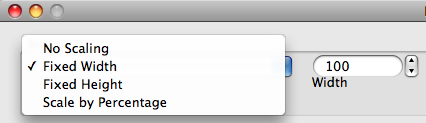
First, Select how you would like to resize the batch of pictures. You can choose Fixed Height, Fixed Width, or Scale by percentage.
into the box on the right. After the files are loaded into the window, simply select your resizing, rotating, border and saving options.
First, Select how you would like to resize the batch of pictures. You can choose Fixed Height, Fixed Width, or Scale by percentage. 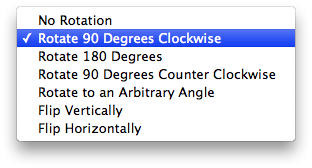
Next, Select how you would like to rotate your images. You can choose any arbitrary angle, or you can choose from some of the popular pre-set angles.
 Choose if you would like to add a border (useful for padding on web pages). There is also a color picker to the right, which allows you to select the color for your border.
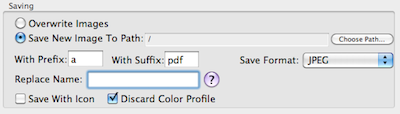 Choose how you would like to save your picture files. You can save them in a new location, or add a prefix or suffix to the name. You can also add an icon preview.
How Do Minimize the size of my files?
If you are Posting your images to the web, you will probably want to have your files be as small as possible. One way to help accomplish this is to leave the "Save With Icon" box unchecked. Saving with an icon is not necessary on Snow Leopard because the OS automatically generates an icon preview. Also, saving with an icon is irrelevant for images that are solely viewed on the web. Another way to reduce file size for JPEG images is to select a lower quality setting. As you choose a lower quality setting, information is discarded from your image file - and you cannot get it back. Therefore, if you are using this option, we recommend that you save as a copy instead of overwriting your image.
My images look different on other computers. What do I do?
You probably want to discard the color profile. To do this, simply check the box that says "Discard Color Profile" The application will then save your image without an embedded color profile. If you do not check this box, the existing color profile will be retained. To learn more about embedded color profiles, you may wish to read this Wikipedia page.
How do I change the extension to jpg?
By default, batch image resizer saves your jpeg files with the extension JPEG. If you would like for your file names to end with jpg instead, simply go to the preferences, and check the box that says "save as jpg."
How do I get the free updates?
Once you purchase Batch Image Resizer, updates are free for life. To get those updates, please save the email that you were sent when you purchased. As updates are released, you can return to the link provided in the email to obtain updates.
What is the "Make Iconset" option?
If you're a developer making icons for your apps with Photoshop, then you may have noticed that it is very time consuming to save your icon in all 10 sizes that Apple requires. Let Batch Image Resizer do this for you! Batch Image Resizer will take your 1024x1024 pixel image and convert it to the 10 following sizes with these file names:
- icon_16x16.png
- icon_16x16@2x.png
- icon_32x32.png
- icon_32x32@2x.png
- icon_128x128.png
- icon_128x128@2x.png
- icon_256x256.png
- icon_256x256@2x.png
- icon_512x512.png
- icon_512x512@2x.png
- Drag the 1024x1024px icon file into the main Batch Image Resizer Window
- Check The box that says "Create Iconset"
- Click the button that says "Click Here to Resize Images"
Page Last modified: January 24, 2015
Buy Batch Image Resizer ↓
Download a Free Trial 
Supported OSs:
Big Sur (11.0) end-of-lifeCatalina (10.15) 64-bit
Mojave (10.14)
High Sierra (10.13)
Sierra (10.12)
El Capitan (10.11)
Yosemite (10.10)
Mavericks (10.9)
Mountain Lion (10.8)
Lion (10.7)
Snow Leopard (10.6)
Leopard (10.5)
Tiger (10.4)
Batch Image Resizer:
The Batch Image Resizer software is available for immediate download after purchase. Once you have completed your transaction on PayPal's website, return to GOTOES.ORG to obtain the Batch Image Resizer software. A link is also sent by email. If you do not get the email, check your junk mail filter! The Batch Image Resizer program is compatible with Mac OS X up to Big Sur. Our free trials are full featured. The only limitations are the number of items you can process.