

Help Resizing Photos:
Why is Permission Denied In Mojave?
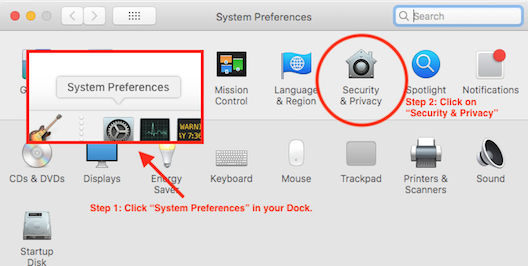
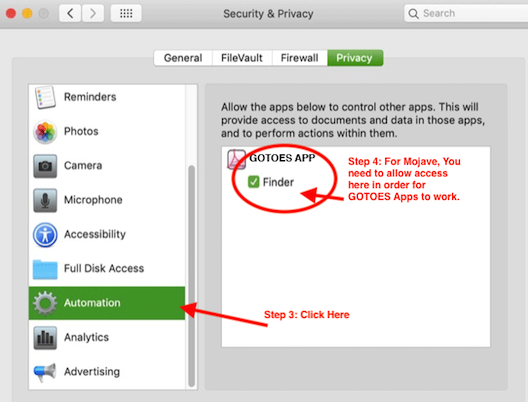
Mojave has increased security, so the first time you startup one of our apps on Mojave, you will need to grant it permissions to system events. If you did not do that on the first startup, please follow these steps:
 For the most Information:
Please check out our How To use Batch Image Resizer section. There you will find examples and step by step tutorials for each feature.
How do I get the software?
After you pay for the software, you will be redirected to a page where you can download the full version. You will also get an email link with the software.
Why isn't the latest version available on the Mac App Store?
Whenever we produce a new version of Batch Image Resizer, we immediately upload it to our website. We also submit it to the App Store. The app store manually reviews our software - a process which can sometimes take over a month. If you want to get the most prompt updates, we recommend that you purchase directly from our website. Updates are free for life, and we are frequently adding new features.
What can I do with your program?
- You can re-size a batch of images.
- You can rotate multiple pictures.
- You can add a transparent border to a batch of images.
- You can save a batch of photos with a new name, add a prefix, or suffix.
- You can save several pictures with an icon preview.
- You can watermark a batch of pictures.
- You can rename files on the fly as you are resizing them - all in ONE STEP!
Do you have a Free Version?
There is a Free Trial (Link to left). The Free version will allow you to re-size, rotate, and otherwise manipulate up to 3 pictures at a time. The free trial is otherwise full-featured.
Page Last modified: October 24, 2019
Buy Batch Image Resizer ↓
Download a Free Trial 
Supported OSs:
Big Sur (11.0) end-of-lifeCatalina (10.15) 64-bit
Mojave (10.14)
High Sierra (10.13)
Sierra (10.12)
El Capitan (10.11)
Yosemite (10.10)
Mavericks (10.9)
Mountain Lion (10.8)
Lion (10.7)
Snow Leopard (10.6)
Leopard (10.5)
Tiger (10.4)
Batch Image Resizer:
The Batch Image Resizer software is available for immediate download after purchase. Once you have completed your transaction on PayPal's website, return to GOTOES.ORG to obtain the Batch Image Resizer software. A link is also sent by email. If you do not get the email, check your junk mail filter! The Batch Image Resizer program is compatible with Mac OS X up to Big Sur. Our free trials are full featured. The only limitations are the number of items you can process.